Free to try · no account, no card

Study from your own lectures, not someone else’s notes.

Drop in the slides your professor posted. Kwezr reads them and writes flashcards and quiz questions from what is actually on the pages, in English or Arabic. Take the quiz here first. Sign up only if you want to keep it.

  • Try it on this page before making an account
  • Every question points to the page it came from
  • Web, iPhone and Android

Free plan on every platform. Cancel whenever you like.

  • No account to try it Upload, get the questions, answer them. Signing up is only how you keep them.
  • Questions point to a page Each one names the page it came from, so you can open your file and check.
  • Arabic, done properly Right-to-left throughout and real Arabic type, not a translated interface.
  • Your file builds your set It is read to make your topics, cards and questions. We do not sell your data, and you can delete everything.
01How it works

Three steps. About a minute.

  1. Upload a lecture

    PDF, PowerPoint, Word, plain text, or a photo of the slides. Kwezr reads all of it, in English or Arabic.

  2. Get your study set

    The topics it found, a summary of each, flashcards, and questions: multiple choice, true or false, fill in the blank.

  3. Practise until it sticks

    A short quiz finds the gaps. Cards come back just before you would forget them, spread over the days until your exam.

02What you get

One file in. A whole study set out.

Everything below is made from the lecture you upload. Nothing is pulled from someone else’s course.

01Topics and summaries

The lecture, broken into the pieces you actually need to learn.

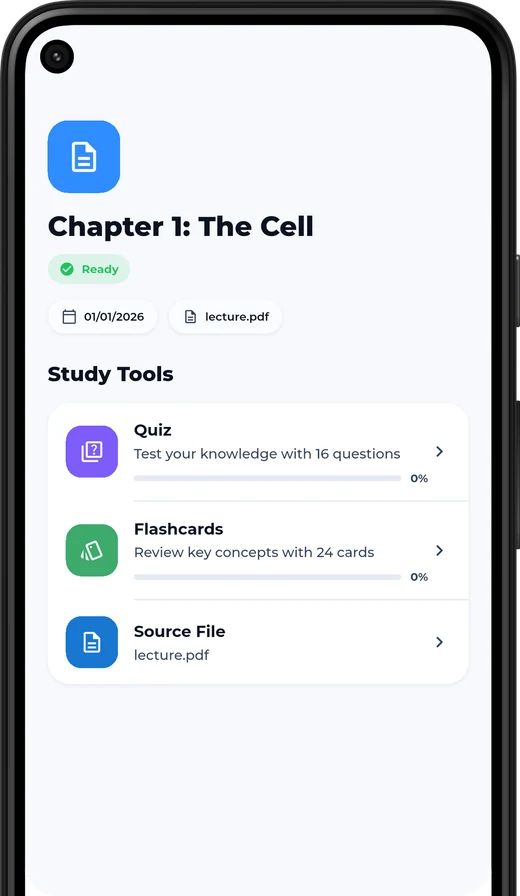
Kwezr splits a long deck into its topics, writes a summary of each, and shows how far along you are with every one.

  • Topics in the order the lecture teaches them
  • A summary you can read in two minutes
  • Progress tracked per topic, not per file
A lecture screen in Kwezr showing its quiz, flashcards and source file
02Quizzes

Questions from your pages, with the page number attached.

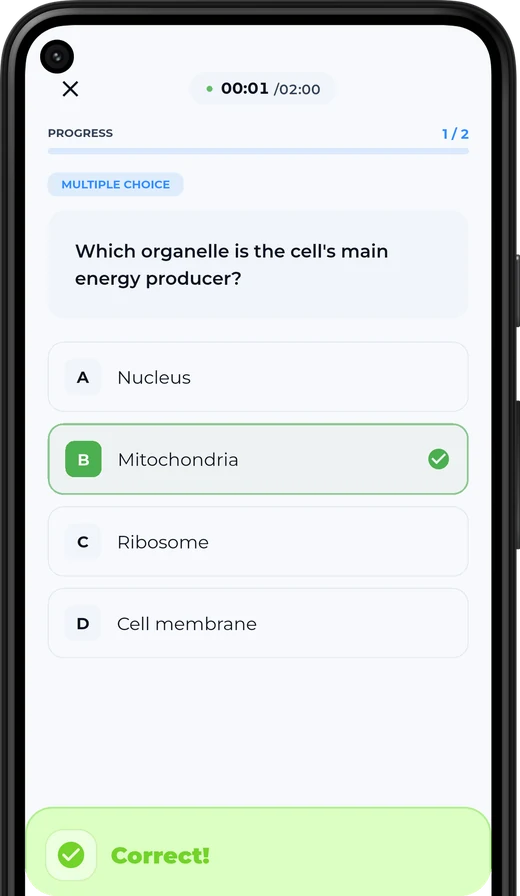
Multiple choice, true or false and fill in the blank, all written from what is on your slides. Get one wrong and you see the explanation and the page it came from.

  • Explanations, not just a red cross
  • Mastery per topic, so revision time goes where it counts
  • Mixed quizzes across a whole course before an exam
A multiple-choice question in Kwezr with the correct answer marked
03Flashcards

Cards that come back right before you would forget.

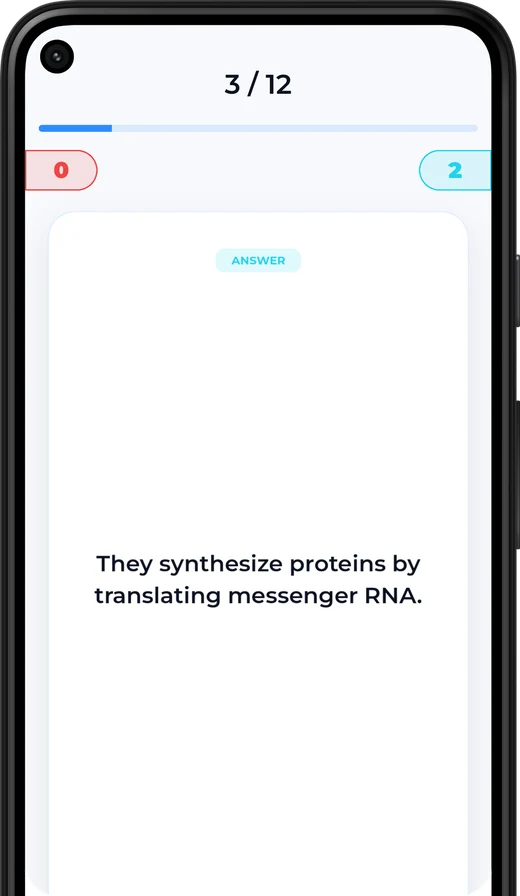
Rate a card Again, Hard, Good or Easy. Kwezr schedules the next time you see it, and spreads review over the days you have left before the exam.

  • Spaced repetition, tuned to your exam date
  • Cards made from the file, not a shared deck
  • A streak that makes short daily sessions stick
A flashcard in Kwezr showing the answer side, card 3 of 12
04The assistant

Ask about your own slides and get the page number back.

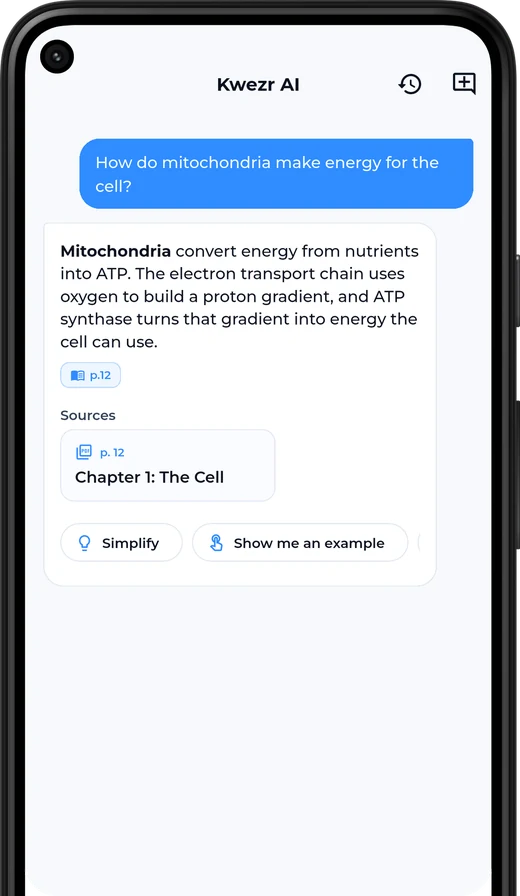
Kwezr answers from the file you uploaded, not from the open internet. Every answer names the page it used, so you can go and check. Ask it to simplify, compare two ideas, or sum up a chapter.

  • Answers cite the page in your file
  • Say “simplify” when it goes over your head
  • Works in English and Arabic, on any lecture in the course
The Kwezr assistant answering a question and citing page 12 of the lecture
03Who it’s for

If your course has slides, it works.

There is no subject-specific model behind Kwezr. It reads whatever you give it, so it gets used hardest in the years with the most to memorise.

  • Medicine and nursing
  • Engineering
  • Law
  • Business and accounting
  • Sciences
  • Languages

And in finals week, at around 2am.

04The difference

Kwezr next to a ready-made deck or a general chatbot.

What you get Ready-made decks and general chatbots Kwezr
Where the questions come from A stranger’s deck, or the whole internet The lecture you uploaded
Checking an answer No source to open The page number in your own file
Trying it out Account first Upload, quiz and score on this page, no account
Knowing what you don’t know Same cards for everyone Mastery tracked per topic
The exam date Fixed intervals, or none Review spread over the days you have left
Arabic Translated menus, or none Right-to-left throughout, in proper Arabic
05Pricing

Start free. Pay only if it helps.

No card to try it. Take the quiz above with a real lecture and decide afterwards.

Free
Free, for as long as you like

Enough to find out whether it suits you.

  • Up to 2 courses
  • Up to 6 lectures a month
  • Up to 3 lectures per course
  • 5 assistant messages a day
  • Flashcards and quizzes from your own files
  • Full trial before you sign up
Start with a lecture
Kwezr Pro
A subscription. The current price is shown in the app.

For the semester you need to get right.

  • Unlimited lessons: a guided read-through of each lecture
  • Unlimited lectures and courses
  • A full study plan up to your exam date
  • Review in the order the cards are due
  • Unlimited assistant messages
  • Your uploads go first in the queue
Get the app

Pro is billed through the App Store or Google Play. Subscriptions renew automatically unless cancelled at least 24 hours before the period ends, and you can cancel from your store account at any time.

Invite friends

Bring your study group. Earn Pro time.

Every account has a referral code. Send it to the people you already share notes with, and you earn free Pro time when they join. No purchase needed.

Your files

Your lectures stay yours.

  • They build your study set. Your files make your own topics, cards, questions and assistant answers. Nothing else.
  • They belong to your account. Your courses and lectures are private to you. We do not sell your data.
  • You can delete them. Remove a lecture, a course, or your whole account from the app, whenever you want.

Read the privacy policy

06FAQ

Questions students ask.

Do I need an account to try it?

No. Drop a lecture into the card at the top of this page, or use the sample lecture, and take the quiz. An account is only needed to save the result and keep studying from it.

What happens to the file I try on this page?

It is read once to build the preview: the topics, questions and flashcards you see. Nothing is added to an account unless you choose to save it. See the privacy policy for the full detail.

Which file types can I upload?

PDF, PowerPoint (PPTX), Word (DOCX) and plain text, plus photos of slides or handwritten notes (JPG, PNG, WEBP, HEIC). Files up to 20 MB work on this page.

Does it work in Arabic?

Yes. The whole product is bilingual with a proper right-to-left layout, and Kwezr builds study sets from Arabic lectures as well as English ones. Switch this page to Arabic from the top bar to see it.

Is it accurate? Can I check where an answer came from?

Questions and assistant answers name the page they came from, so you can open your file and verify. AI can still make mistakes, so treat your lecture as the source of truth for anything that ends up in an exam answer.

How long does a lecture take?

Most files are ready in about a minute. Long decks, scanned pages and photos take longer, because the text has to be read out of the images first.

Can I use photos of handwritten notes?

Yes. Photograph the slides or your own notes and Kwezr reads the text out of the image. Clear, well-lit photos give the best results.

Is there a web version?

Yes. Everything works in the browser at kwezr.app/web, and the iPhone and Android apps use the same account, so your courses are in both places.

How do I cancel Pro?

Pro is billed through the App Store or Google Play. Cancel from your store account settings at any time; you keep Pro until the end of the period you paid for.

Upload one lecture tonight.

You will know inside a minute whether this is worth your time.

KwezrUpload a lecture and take the quiz. No account. Try it free